Release notes are a monthly roundup of the new features, enhancements, and API updates to Marketplace demand and supply products, and Lucid Impact Measurement.
 Cint Exchange
Accurately estimate target group LOI with automated suggestions
When entering an LOI estimate in a new target group, you’ll be presented with automated suggestions based on the median actual LOI of previous projects. Simply choose one of the suggestions or enter your own LOI to proceed with target group setup.
Entering accurate LOIs helps to better estimate feasibility and CPI. This has a positive influence on the marketplace dynamic by building trust with respondents and suppliers.

Field faster by targeting Response IDs
Until now, excluding past completes or recontacting respondents meant converting Response IDs (RIDs) into Respondent IDs (RSIDs) first, typically with assistance from the Support Team. Now, you can recontact or exclude respondents by using RIDs directly in the platform, and the uploaded data will be automatically matched to the correct RSIDs.
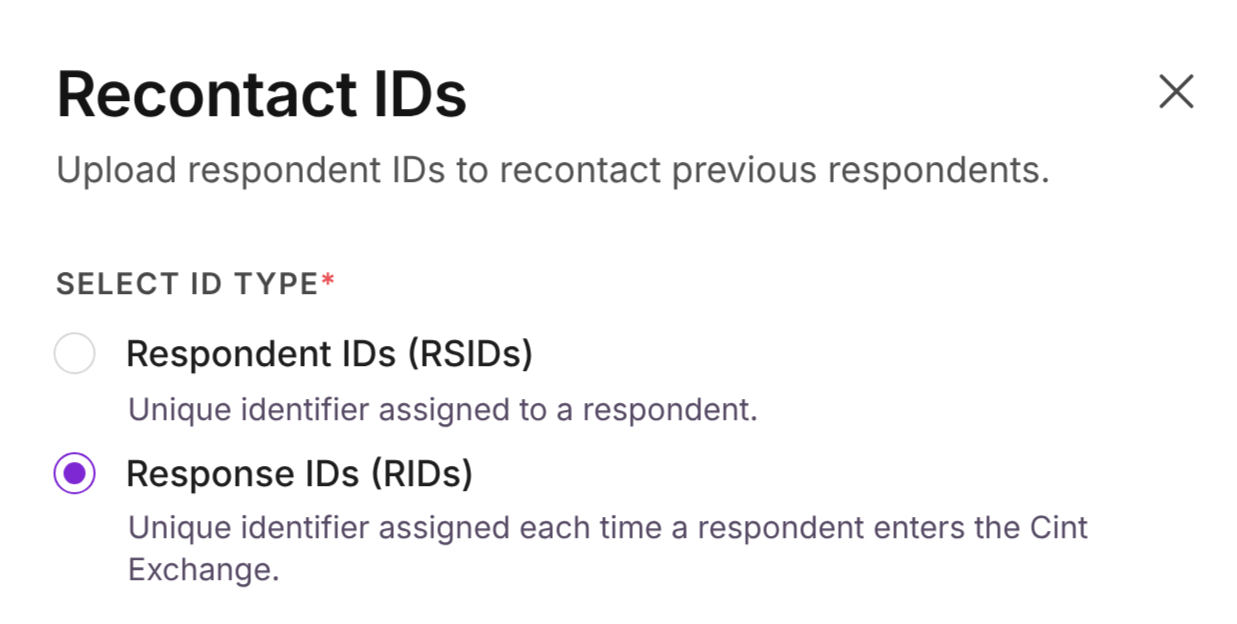
See the Recontact respondents FAQ or the Respondent ID exclusions FAQ for more information.
Easily search for relevant accounts with an active search bar
If you operate more than one account in the Cint Exchange, you can now find the one you need faster. The account selector opens with the search bar ready, and matching accounts are highlighted as you type.

Coming soon: Removal of the Recruitment study type
The Recruitment study type is being removed from the Cint Exchange UI and API.
This change aligns our study types with our existing policy. Projects cannot be used to recruit respondents into a separate panel. Recruiting into a research project itself, such as a focus group, community build, diary study, or recontact, is still allowed.
We will confirm the exact removal date two weeks in advance.
If you integrate via API, please update any cached or hard-coded study type values ahead of removal.
See the Recruitment Study Type Removal FAQ for more information.
 Marketplace
Launch your next project in the Cint Exchange
We're opening the Cint Exchange in phases, alongside your existing Marketplace access.
The Cint Exchange is built to make launching your projects faster and easier. You can launch a target group in as little as 2 minutes, set it up on a single page, and see what it can deliver before you go live.
If your account is in this phase, you will hear from us by email with everything you need to get started. Your Marketplace access and projects stay exactly as they are.
To learn more about the Cint Exchange, you can sign up for one of our upcoming webinars. Can't make it? Every session is recorded.
Suppliers
Reminder: Dig deeper into performance with upgraded supplier reports
The supplier reports have a brand-new UI, with the ability to filter, sort, export, and view your data in different formats.

All seven reports are included:
Feed Dashboard
Match Dashboard
Reconciliation Pacing
Performance Summary
Yield Management
Standard Terms
RPI Tiers
If you both buy and supply, you can switch between buyer and supplier views. Data refreshes every 24 hours.
See Supplier reports in the Cint Exchange FAQ or Supply Reporting Dashboard for more information.
 Cint Engage
Protect panelist accounts with login attempt limits
To protect panelist accounts, logins are now limited to five attempts per hour. After the fifth attempt, further attempts are blocked for one hour. Panelists who reach the limit will see a clear message on the login screen showing when they can try again, along with options to get back into their account, such as resetting their password or logging in with a link.

Protect panelist accounts and earnings with one-time passwords for sensitive actions
Panelists now need to enter a one-time password for sensitive actions such as redeeming rewards, updating their password, or changing their email address.
The six-digit code is sent to the panelist's email address. It expires after 10 minutes and can only be used to approve the action the panelist requested. The number of incorrect attempts and code resends is limited, which helps protect accounts against automated guessing attacks.

See OTP for sensitive panelist actions FAQ for more information.
Reminder: Match more panelists to the right surveys with Dynamic Profiling
Dynamic Profiling uses live buyer demand to ask your panelists the profiling questions that matter most right now, in the Panelist Hub and occasionally just before a survey. More panelists get matched to surveys they qualify for, with fewer screen-outs. Questions are never asked twice, and a new Completed tab lets panelists see every answer they’ve given and where it was collected.

If you have any questions about these updates, reach out to your Cint account team or support@cint.com.
 Lucid Measurement
Reminder: Compare campaign tactics side by side with filtered result exports
Export your advanced filter results to compare tactics, for example Creative A only versus Creative A and Creative B. Saved filters can be set at the campaign or account level, so everyone viewing a study sees the same filters.
See Measurement Advanced Filters for more information.
Reminder: Interpret sales lift results accurately with new data dates
The Sales Lift section of your Outcomes dashboard now shows when the data was last updated and the date of the last transaction. Sales lift data updates weekly, while brand lift updates daily, so you can see exactly how current your results are.
See Outcomes Measurement: Reading results for more information.
Reminder: Contextualize your brand lift results with newly updated Lucid Measurement benchmarks
Our Lucid Measurement benchmarks have been updated with the latest data from Q3 2026.
See Benchmarks Campaign Performance for more information.
Reminder: Launch new outcomes measurement studies in minutes
Accelerate time to launch and improve productivity by easily creating and launching Outcomes Studies directly in Study Creator.
See How to Save Time and Effort in the Updated Lucid Measurement for more information.
If you have any questions about these updates, reach out to your Cint account team or support@cint.com.
Subscribe to the product status page with daily uptime and performance information for all core Cint services. Subscribe today!