In Cint Exchange, study-level security and exclusion controls are managed at the target-group level. These settings help you limit repeat participation, exclude specific respondents or prior study participants, and support cleaner sample management across related projects.
While legacy Marketplace documentation may refer to Survey Groups, Cint Exchange uses more direct exclusion controls within the project and target-group workflow.
Study-level controls in Cint Exchange
Respondent activity exclusions
Respondent activity exclusions let you exclude respondents based on prior participation in selected projects or target groups. This is useful for trackers, wave studies, audience protection, and avoiding overlap across related research.
With these exclusions, you can:
Exclude respondents from specific target groups
Exclude respondents from entire projects
Apply an exclusion period so respondents remain ineligible for a defined amount of time after participation
This replaces the legacy Marketplace approach of managing exclusions through Survey Groups.

See the following articles for more information:
Configurable exclusion periods
Cint Exchange supports configurable exclusion windows for respondent activity exclusions. Instead of relying on only a fixed default window, customers can define how long an exclusion remains active after a qualifying participation event.
Externally facing guidance should describe this as:
Configurable duration: Exclusions can be set for a defined period
Flexible timing: Duration can be tailored to the research design and reuse policy
Automatic expiration: The exclusion ends automatically when the configured period has elapsed
Open beta: Respondent exclusions in Cint Exchange support excluding target groups or projects, with configurable exclusion periods available in the product.

See Respondent exclusions in TG advanced settings for more information.
Per-status exclusion configurations
For accounts with access to advanced exclusion controls, exclusion behavior can be configured based on respondent outcome status rather than applying one identical rule to every outcome.
This can support different treatment for statuses such as:
Completes
Terminates
Overquota
Security failures
This gives research teams more precise control over who should be blocked, and for how long, based on how the respondent interacted with a prior study.
Availability: Per-status exclusion configurations are limited-access and may only be available for eligible or enterprise accounts.

See Respondent exclusions in TG advanced settings for more information.
Exclusion groups for API customers
For API-based workflows, Cint Exchange also supports exclusion group capabilities designed to help customers exclude respondents from defined target groups programmatically. This is especially useful when survey setup and field management happen outside the UI.
Respondent ID exclusions
If you need to prevent known respondents from entering a target group, Cint Exchange supports exclusion by respondent identifiers. This is useful for suppressing known bad actors, imported blocklists, or respondents who participated through another source.
Depending on the workflow, supported ID types may include platform-specific respondent identifiers used in Cint Exchange operations.

See Respondent ID exclusions in TG advanced settings for more information.
Always-on Trust & Safety protections
Not all security protections are configured at the study level. Cint Exchange also includes platform-level Trust & Safety controls that are always active or managed centrally.
Fraud prevention through IP and session checks
Cint Exchange includes automated fraud prevention measures that check traffic patterns, session integrity, and other signals designed to reduce invalid participation. These protections are platform-managed and not typically exposed as customer-configurable settings.
For external help content, describe these protections at a high level. Avoid publishing internal implementation details, detection thresholds, or operational logic.
Bot protection
Cint has also tested additional bot protection capabilities, including DataDome-based protection. Where appropriate, customer-facing documentation should position this as part of the broader Trust & Safety approach rather than as a self-service study setting unless product UX explicitly exposes it.
Auto Survey Health notifications
Auto Survey Health helps monitor live survey quality and operational health across target groups in both the UI and API. When issues are detected, the system can notify users so corrective action can be taken quickly.
Customer-facing language can describe this feature as helping teams:
Monitor target-group health during fieldwork
Identify issues earlier
Respond to quality or setup problems faster
Example of an Auto Survey Health notification:
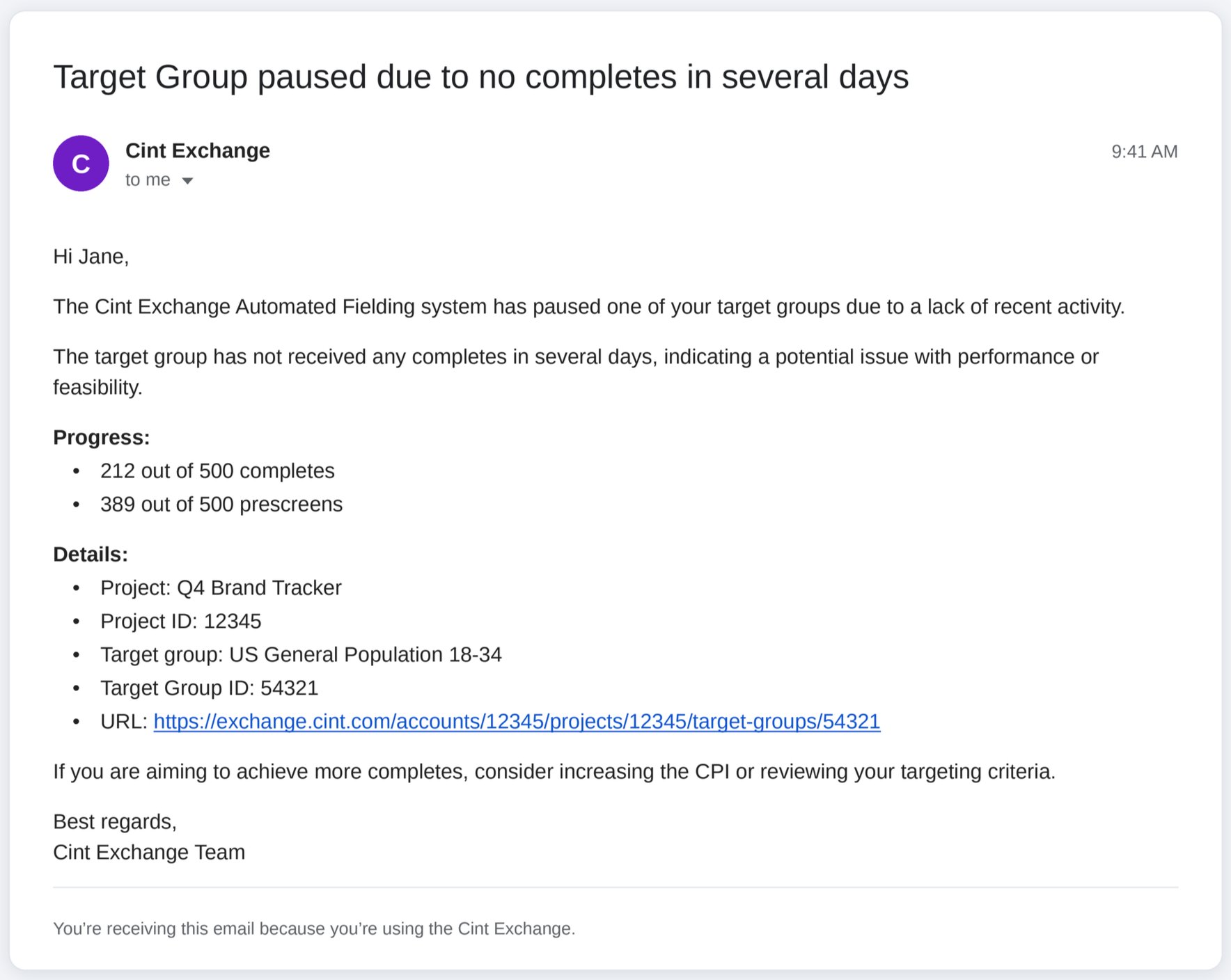
See CintX Auto Survey Health Notifications FAQ for more information.
How to set up exclusions:
See the following articles for information on how to set up the various types of exclusions:
Frequently Asked Questions
FAQ
How does Cint Exchange handle exclusions compared with Marketplace Survey Groups?
Cint Exchange uses direct respondent exclusion controls at the project and target-group level rather than the legacy Marketplace Survey Group model.
Can I exclude respondents who took part in a previous project or target group?
Yes. Cint Exchange supports respondent activity exclusions that can exclude respondents based on prior participation in selected projects or target groups.
Can I configure all security protections at the study level?
No. Some protections are always on as part of Cint's Trust & Safety framework and are not configurable in the study setup workflow.